
Managed reporting
Managed reporting services that keep your Data Studio reports working
Our managed reporting services keep your Data Studio dashboards accurate, working and up to date on a monthly retainer. They suit marketing agencies, ecommerce brands and finance or operations teams who rely on their reports every week but have nobody whose job is to look after them.
Quick answer
What do managed reporting services include?
Managed reporting services cover the ongoing care of your dashboards after they are built: monitoring data sources and connectors, fixing breaks and quota errors, handling change requests, adding new views, and keeping documentation current. For Data Studio, that means a team checks every report on a schedule instead of waiting for someone to notice a problem.
- Data Studio does not warn anyone when a connector breaks, so we check.
- Change requests and new views are handled by the team that knows your model.
- Platform changes, field deprecations and quota issues are fixed before reports go out.
- Documentation stays current, so the reporting never depends on one person's memory.
Why do Data Studio reports need managed reporting services?
Because reports decay. Data Studio gives no warning when a connector breaks, a credential expires or a platform renames a field, so a chart quietly shows zero or an error until someone important notices.
Sources change underneath reports all the time. Google sunset the Google Ads location extension fields on May 4, 2026, and MySQL 5.6 and 5.7 connections are being retired by February 26, 2027. Each change like that breaks something in somebody's dashboard. Managed reporting services exist so that a team spots it, fixes it and tells you, before the Monday meeting rather than during it.
What do we monitor each month?
We check every report in scope on a fixed schedule and after any known platform change. The checks are practical and written down, so nothing depends on memory.
- Data freshness: the latest date loaded for each source, against what it should be.
- Connector health: expired credentials, revoked access and partner connector errors.
- Quota and row errors: GA4 quota messages and "too many rows" failures on busy pages.
- Totals: key figures reconciled against the source system for the last closed period.
- Sharing: who has access, and whether anyone who left still owns a data source.
- Scheduled delivery: that emails and, on Pro, Slack or Google Chat sends still go out.
What you get
What we build
Scoped and quoted at a fixed price after a free review.
Scheduled health checks
Freshness, connector, quota and total checks on every report in scope.
Break fixes
Credential, field and connector problems fixed and reported to you.
Change requests
New filters, metrics, charts and pages handled through one queue.
Monthly note
A short summary of what was checked, fixed and changed, and what is coming up.
Living documentation
Sources, owners, definitions, schedules and a change log kept current.
Platform change watch
Deprecations and connector changes tracked and handled ahead of time.
How are change requests and new views handled?
You send requests to one place, and a named lead triages them. Small changes such as a new filter, a renamed metric or an extra chart are usually done within the cycle. Larger ones, such as a new data source or a new page for a department, are scoped and scheduled with you.
Because the same team built or has learned your model, changes are made where they belong. A new metric goes into the data source or BigQuery table once, not as a calculated field copied into five charts, so the report stays consistent as it grows.
How do you deal with GA4 quota errors and slow reports?
We find the cause and remove it, rather than asking viewers to refresh again. The standard GA4 Data API quota is 14,000 tokens per project per property per hour, and reports with many GA4 charts and many viewers hit it.
Fixes range from light to structural: fewer GA4 charts per page, an extract data source for historical periods, owner's credentials where appropriate, or moving GA4 data into BigQuery. For slow pages, we look at blends (capped at 5 sources), heavy calculated fields and wide date ranges, then rebuild the slowest parts against pre-aggregated tables.
What documentation do you keep?
We keep a living record of every report, data source, owner and metric definition, updated whenever something changes. It is written for your team, not for us.
That record includes which credentials each source uses, what each calculated field and CASE statement does, which schedules send what to whom, and a change log. If you ever move the work in-house or to another provider, the documentation goes with it. For one Australian insurance brokerage, an automated pipeline cut report time from 4 to 5 hours to under 5 minutes and lifted accuracy from about 75% to 99%. Gains like that only last if someone keeps the pipeline and its rules documented and checked.
How is a managed reporting retainer scoped?
We scope it after a free review of your reports, based on how many dashboards and sources are in scope and how often they change. You get a fixed monthly fee and a clear list of what is covered.
Retainers usually start after we build or rebuild a set of dashboards, but we also take over existing reports built by others. In that case the first month includes an audit: we document what exists, fix the obvious breaks and tell you what is fragile.
A named lead owns your account and a small team of analysts does the checks and changes. Our team includes a Business Intelligence Lead, data analysts and an automation engineer, with directors who review finance and analytics work.
Because more than one person knows your setup, cover during holidays or busy months is built in.
What does a typical month look like?
Early in the month, before your reporting deadlines, we run the full health check and reconcile totals for the month just closed. Any break is fixed first, and you hear about it in the same message that says it is fixed.
Mid-month is for change requests and new views, worked through in the order you set. Toward month end we review platform release notes and deprecation notices, test anything that might affect your sources, and prepare the monthly note. A typical note lists what was checked, what broke and why, what changed, and one or two suggestions, such as retiring a page nobody opens or moving a slow source into BigQuery.
If something urgent breaks between checks, you message your lead directly and it goes to the top of the queue.
Case study · Insurance brokerage, Australia
From 4-5 hours of spreadsheet work to a report in under 5 minutes
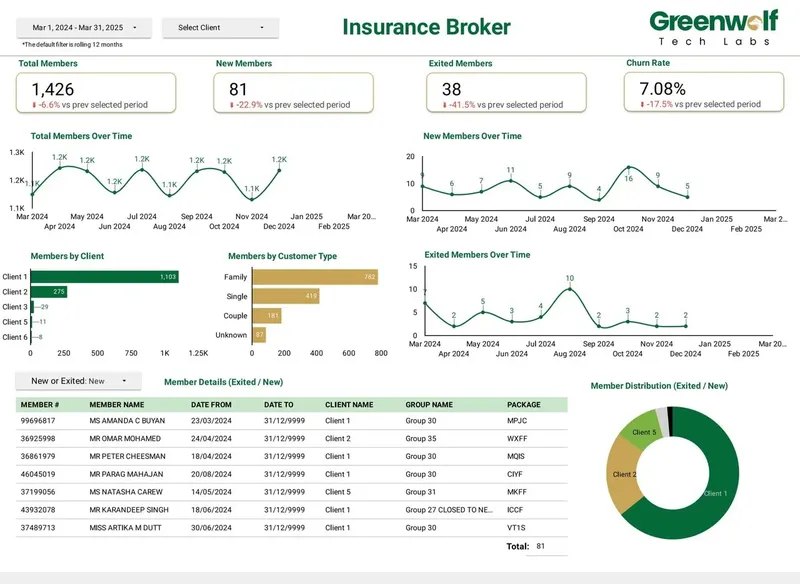
Monthly reports were assembled by hand from inconsistent .xls files sent by several insurers. The files now land in Google Drive, are mapped into one central sheet with the business rules applied, and feed a Data Studio dashboard.
- Report time: 4-5 hours to under 5 minutes
- Reporting accuracy: about 75% to 99%
- Visibility across insurers: limited to real time, with filters
How it works
How a project runs
- 01
Free review
We look at your reports, sources and how your team uses them.
- 02
Scope and fee
We agree what is covered and a fixed monthly fee.
- 03
Onboarding audit
We document every report, fix obvious breaks and flag fragile parts.
- 04
Monthly cycle
Checks, fixes and change requests run on a set schedule with a named lead.
- 05
Quarterly review
We look at usage and suggest what to retire, simplify or add.
FAQ
Frequently asked questions
What is included in managed reporting services?
Monitoring of data sources and connectors, fixes for breaks and quota errors, change requests and new views, and up-to-date documentation. The exact list is agreed per client in the scope.
Can you manage Data Studio reports someone else built?
Yes. The first month includes an audit where we document the reports, fix obvious problems and tell you which parts are fragile.
Does Data Studio alert you when a data source breaks?
No. Data Studio does not warn anyone when a connector stops working, which is why we run scheduled checks on data freshness and connector health.
How much do managed reporting services cost?
We quote a fixed monthly fee after a free review. It depends on how many reports and sources are in scope and how often they change.
Can we cancel or bring the work in-house later?
Yes. The documentation we keep is yours, and we hand over everything needed for your team or another provider to continue.
Do managed reporting services include Data Studio Pro administration?
They can. For Pro customers we manage team workspace roles, report ownership in the Google Cloud project, delivery schedules and alerts, alongside the reports themselves.
Do you cover white label client reports for agencies?
Yes. For agencies we check every client report before monthly sends, handle new client onboarding and roll template changes across the roster.
Keep reading
Related pages
Get started
Tell us what your reporting has to do
Describe the dashboards you need, who reads them and where the data sits. We reply within one business day with an approach, the connectors involved and a fixed-price plan.
- Free 30-minute reporting review
- Fixed quote before any work starts
- Everything built and owned in your Google account
Prefer email? info@greenwolftechlabs.com
Get a free proposal
Two lines is enough to start.