
Comparison
Data Studio vs Power BI: which one should your team use?
Data Studio vs Power BI is usually a choice between a free, browser-based tool built around Google's ecosystem and a licensed BI platform built around Microsoft's. This comparison is for marketing teams, agencies and finance or operations leaders deciding where their reporting should live. Our team builds in both, so we have tried to be fair about where each one is stronger.
Quick answer
Is Data Studio better than Power BI?
Neither is better in every case. In the Data Studio vs Power BI choice, Data Studio usually wins for free, shareable marketing and Google-ecosystem reporting, while Power BI usually wins for heavier data modelling inside Microsoft-based organisations. Data Studio is free, with Pro at $9 per user per project per month; Power BI uses per-user licensing for sharing.
- Data Studio is free to build and view; Pro costs $9 per user per project per month.
- Power BI uses per-user licensing for sharing, so check Microsoft's current pricing.
- Data Studio fits Google data sources; Power BI fits Microsoft stacks and heavier modelling.
- Many companies use BigQuery with Data Studio to cover modelling and scale needs.
What is the main difference between Data Studio and Power BI?
Data Studio is a free, web-based reporting tool from Google that connects directly to sources such as GA4, Google Ads, Search Console, Sheets and BigQuery. Power BI is Microsoft's BI platform, built around a data model where tables, relationships and measures are defined before reports are designed.
In practice that means Data Studio is quicker to start and easier to share, especially for marketing data, while Power BI asks for more modelling up front and gives more modelling power in return. Neither choice is wrong; it depends on where your data lives and who will build and read the reports.
The two tools also come from different working habits. Data Studio feels like Google Docs: open a browser, connect a source, share a link. Power BI feels like a modelling environment first and a canvas second. Teams that already think in tables, relationships and measures tend to be comfortable in Power BI, while teams that think in channels, campaigns and spreadsheets tend to move faster in Data Studio.
How do Data Studio and Power BI compare side by side?
The table below summarises the differences that matter most in projects. For Power BI pricing we deliberately do not quote figures, because licences change; check Microsoft's current pricing before deciding.
| Factor | Data Studio | Power BI |
|---|---|---|
| Cost model | Free for creators and viewers; Pro at $9 per user per project per month, viewers need no licence | Per-user licensing for sharing; check Microsoft's current pricing |
| Connectors | Native Google connectors (GA4, Google Ads, Search Console, Sheets, BigQuery, YouTube, CM360, DV360) plus SQL databases and hundreds of partner connectors | Wide connector library centred on Microsoft sources and databases |
| Data modelling | Light: calculated fields, CASE statements, blends of up to 5 sources with equality joins; heavier modelling usually moves to BigQuery | Built-in data model with relationships and measures |
| Row-level security | No built-in row-level rules; handled through viewer's credentials, separate data sources or filtering in BigQuery | Row-level security defined in the model |
| Sharing | Browser link sharing like Google Docs, scheduled email, Slack and Google Chat delivery in Pro | Sharing inside the Microsoft environment, tied to licences |
| Scale | Relies on the source; BigQuery handles large data, while connectors face quotas such as GA4's 14,000 tokens per project per property per hour | Depends on model size and licence tier |
| Learning curve | Low for building reports | Higher, because of modelling |
Data Studio vs Power BI: which costs less?
Data Studio is usually cheaper to run, because building and viewing reports is free. Data Studio Pro, which adds team workspaces, organisation-owned content and advanced scheduling, costs $9 per user per project per month and only creators, editors and managers need it.
Power BI uses per-user licensing for sharing, so the cost grows with the number of people who need to see reports. Some organisations already have licences as part of their Microsoft agreements, which changes the calculation. Check Microsoft's current pricing and your existing agreements before comparing.
Both tools carry costs outside the licence. With Data Studio, the usual extras are partner connectors for platforms such as Meta or LinkedIn and BigQuery storage and queries. With Power BI, extras depend on how data is prepared and hosted. Build cost matters too, and that depends mainly on data quality and the number of sources, not on the tool.
Which tool has better connectors?
Data Studio has the stronger native connection to Google's own products, while Power BI is stronger across Microsoft systems. For marketing reporting, Data Studio's native GA4, Google Ads, Search Console, YouTube, Campaign Manager 360 and Display and Video 360 connectors are hard to beat for speed of setup.
Data Studio also connects to Cloud SQL, MySQL, PostgreSQL, SQL Server and Redshift, and partner connectors from vendors such as Supermetrics, Windsor.ai, Porter Metrics, Funnel, Power My Analytics and Catchr fill most gaps. The trade-off is that each partner connector is another subscription and another thing that can break silently, since Data Studio does not alert anyone when a connector stops working.
A practical tip from our projects: when a client needs both Google marketing data and Microsoft-hosted finance data in one view, we often land everything in BigQuery first. Data Studio then reads one clean, partitioned source instead of several live connectors, which avoids quota errors and keeps refresh times predictable.
Which is better for data modelling and row-level security?
Power BI is stronger for modelling inside the tool. Its data model lets you define relationships between many tables and reusable measures, and row-level security rules live in that model.
Data Studio keeps modelling light. Calculated fields and CASE statements handle most business rules, blends join up to 5 sources with equality joins, and tables on fixed-schema sources like GA4 and Google Ads are limited to 10 dimensions and 20 metrics. Flexible-schema sources such as Sheets, BigQuery and SQL allow 100 of each. When a project outgrows that, we model the data in BigQuery views, partition large tables by date, and point Data Studio at the result. Restricting rows per viewer is then handled in the data layer or with viewer's credentials, which takes more design than a built-in rule.
When does Data Studio win?
Data Studio usually wins when the data is mostly in Google products, the audience is broad, and speed matters more than deep modelling. Marketing agencies reporting across Google Ads, GA4, Search Console and partner-connected social platforms are the classic case.
Data Studio also wins on time to first report. A team with access to its GA4 property and ad accounts can see working charts within the first session, then add calculated fields and filters as questions come up. Recent additions such as cross-data-source filtering, viewer manual refresh, PNG export and fullscreen charts have closed several gaps that used to push teams elsewhere.
- Marketing and channel dashboards built on GA4, Google Ads and Search Console.
- Agencies sending white-label client reports, where free viewing keeps costs predictable.
- Teams whose data already sits in BigQuery or Google Sheets.
- Organisations that want to share reports with many viewers without licensing each one.
- Teams interested in Conversational Analytics, generally available since July 30, 2026, using BigQuery data agents.
When does Power BI win?
Power BI usually wins when the organisation runs on Microsoft, the data model is complex, and row-level security needs to be defined centrally. Finance teams with many related tables and strict access rules often fall here.
Power BI also tends to suit teams that want analysts to build one large shared model and let many report authors reuse it. If your finance team already maintains complex relationships between ledgers, cost centres and budgets, rebuilding that logic as blends would be a step backwards.
- Companies standardised on Microsoft 365 and Microsoft data platforms.
- Reporting that needs many related tables and reusable measures.
- Row-level security that must be defined once in the model.
- Teams where most report readers already have the right licences.
Can a company use both Data Studio and Power BI?
Yes, and many do. A common pattern is Power BI for finance and operations reporting inside a Microsoft environment, and Data Studio for marketing dashboards and client-facing reports that need to be shared widely.
The risk with two tools is two versions of the same metric. Defining shared metrics once, for example in BigQuery views or a common SQL layer, and pointing both tools at them keeps revenue or spend consistent across reports.
Running two tools also means two sets of skills to maintain. Before adding a second platform, check who will own each one, who fixes broken reports, and whether the people reading reports will know which tool holds the agreed number.
How does Greenwolf Tech Labs help teams choose?
We build in both tools, so our recommendation follows your data, your users and your existing licences. In a free review we look at where the data lives, how many people need to see the reports, how complex the model is and what access rules apply, then recommend a tool and quote a fixed price.
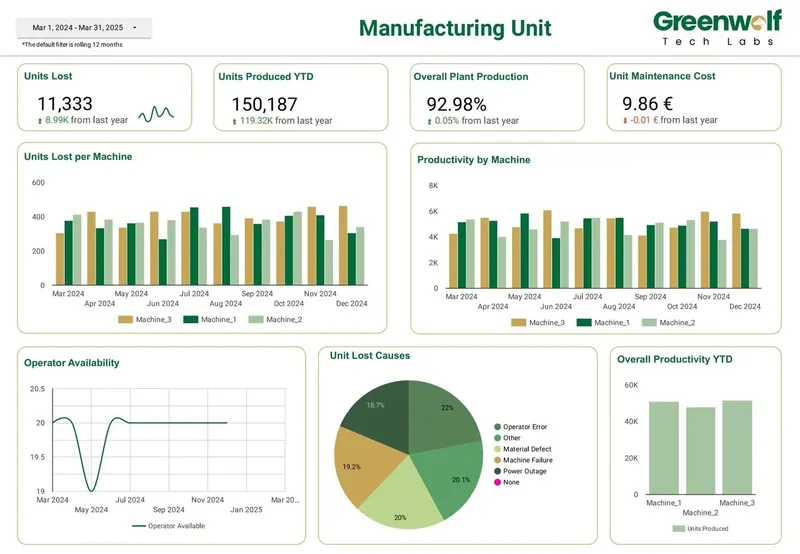
Our Data Studio work includes CFO dashboards that bring cash, revenue, spend and margin into one view, marketing dashboards across Google Ads, Meta, LinkedIn, GA4 and Search Console, and operational dashboards for retail, manufacturing, logistics and procurement teams.
FAQ
Frequently asked questions
Is Data Studio free compared to Power BI?
Data Studio is free for creators and viewers, and Data Studio Pro costs $9 per user per project per month for creators, editors and managers. Power BI uses per-user licensing for sharing, so check Microsoft's current pricing for your case.
Can Data Studio handle large datasets like Power BI?
Data Studio relies on its source for scale. Connected to well-partitioned BigQuery tables it can report on large data, while direct connectors face limits such as GA4 API quotas and too many rows errors on large queries.
Does Data Studio have row-level security?
Data Studio has no built-in row-level security rules like Power BI. Teams restrict data with viewer's credentials, separate data sources per audience, or filtering in BigQuery. It works, but it needs more design.
Which is better for marketing agencies, Data Studio or Power BI?
Data Studio is usually the better fit for marketing agencies. It connects natively to GA4, Google Ads and Search Console, viewers need no licence, and reports are easy to share with clients by link or scheduled delivery.
Can Greenwolf Tech Labs migrate reports from Power BI to Data Studio?
Yes. We review the existing reports and data model, decide what moves to BigQuery or calculated fields, and rebuild the reports in Data Studio. We quote a fixed price after a free review.
Is Power BI harder to learn than Data Studio?
Usually, yes. Data Studio lets people build a report straight from a connected source, while Power BI asks users to understand its data model, relationships and measures. That extra effort pays off for complex models but slows down simple marketing reports.
Keep reading
Related pages
Get started
Tell us what your reporting has to do
Describe the dashboards you need, who reads them and where the data sits. We reply within one business day with an approach, the connectors involved and a fixed-price plan.
- Free 30-minute reporting review
- Fixed quote before any work starts
- Everything built and owned in your Google account
Prefer email? info@greenwolftechlabs.com
Get a free proposal
Two lines is enough to start.